Monday, April 23, 2012

[Forward] Running 32-bit SSIS in a 64-bit Environment

Original Source: http://sqlblog.com/blogs/john_paul_cook/archive/2010/03/24/running-32-bit-ssis-in-a-64-bit-environment.aspx

After my recent post on where to find the 32-bit ODBC Administrator on a 64-bit SQL Server, a new question was asked about how to get SSIS to run with the 32-bit ODBC instead of the 64-bit ODBC. You need to make a simple configuration change to the properties of your BIDS solution. Here I have a solution called 32bitODBC and it needs to run in 32-bit mode, not 64-bit mode. Since I have a 64-bit SQL Server, BIDS defaults to using the 64-bit runtime. To override this setting, go to the property pages for the solution. Select the Debugging node. Select Run64BitRuntime and set it to False. Save your changes.
image
What about when you finish your work in BIDS and you want to use the 32-bit runtime outside of BIDS? It depends on where you execute your package from.
If you double-click a dtsx file from Windows Explorer, it is executed by the SQL Server 2008 Integration Services Package Execution Utility. The default fully qualified path for that tool is C:\Program Files (x86)\Microsoft SQL Server\100\Tools\Binn\VSShell\Common7\IDE\DTExecUI.exe. In other words, it is a 32-bit product, so it doesn’t have any trouble running things in 32-bit mode by definition.
Here’s part of the error message generated from executing the package from a SQL Server Agent job using the default settings:
Description: System.Data.Odbc.OdbcException: ERROR [IM014] [Microsoft][ODBC Driver Manager] The specified DSN contains an architecture mismatch between the Driver and Application
The clue is the part about the architecture mismatch. Using the 64-bit runtime is the default behavior. Fortunately this is easy to change within the job definition by checking the Use 32 bit runtime checkbox.
image

Friday, April 20, 2012

4.1 Maximum Sub Array

I studied the maximum sub array problem from <Introduction to Algorithms>. I'm gonna write down the notion so that I can recall it in the future easily.

The problem
I won't describe the whole problem such as buying or selling a stock. Instead, I'm going to describe the the problem in another words. For a given integer array, which contains some positive or negative values, try to find a continuous sub array that the sum is the maximum.

Here is an example:
Array = {13, -3, -25, 20, -3, -16, -23, 18, 20, -7, 12, -5, -22, 15, -4, 7}
From the given array, we can easily find out the sub array, which is {18, 20, -7, 12}. We can get it because we are good at mathematics. But how to resolve it in programming? That's the maximum sub array problem.

The traditional solution
I do not want to speak so much about the traditional solution coz the most of programmer can tough it when he/she really think about it. But I still need to describe them because we can analyze it and compare with the Divide-Conquer-Combine solution. Okay, here we go!

The easily way to resolve this problem is adding these items one by one, comparing the sum to get the maximum sum, iterating all array items. After that, we will get the maximum sum sub array. Here is the pseudocode:

GetMaxSum(int currentIndex)
{
    sum = -∞;
    max = -∞
    right = -1;
    for(int i = currentIndex; i < array.Length; i++)
    {
        sum += array[i];
        if(sum > max)
        {
            max = sum;
            right = i;
        }
    }
    return (currentIndex, right, max);
}

This is the core code, and we still need a calling procedure, which will iterate the whole array and compare the result one by one. Such as:
First value 13: -3, -25 .......
Second Value -3: -25, 20, -3 .......

We can easily analyze the running times. In the for loop in the GetMaxSum method, it costs array.Length - current index times. For the calling procedure, because we will iterate the whole array (except the final one), which length is array.Length - 1. So the final running times should be ((array.Length -1) + 1)*(array.Length - 1)/2. In another words, it's (n-1) + 1)*(n-1)/2. So far, we can easily get the Θ(n2).

The Divide-Conquer-Combine solution
For the divide-conquer-combine solution, we can divide the array to two parts, such as [first, mid] and [mid + 1, last]. Then, we can try to find the sub array. But before that, it looks like we miss one important criterion that the sub array can cross the mid, which is [i, j]. i first < i < mid, mid < j < last. That's an important one. Okay, now we get three criteria:
1. sub array are in [first, mid]
2. sub array are in [mid + 1, last]
3. sub array are in [i, j], i first < i < mid, mid < j < last

Let me show the pesudocode for the third one first:
GetCrossingSubArray(int mid)
{
    left = -1
    leftMax = -∞;
    sum = -∞;
    for(int i = mid; i >= first; i--)
    {
        sum += array[i];
        if(sum > leftMax)
        {
            left = i;
            leftMax = sum;
        }
    }

    right = -1

    rightMax = -∞;
    sum = -∞;
    for(int i = mid; i <= last; i++)
    {
        sum += array[i];
        if(sum >  rightMax)
        {
             right = i;
             rightMax = sum;
        }
    }
    return (left, right, leftMax + rightMax);
}

Also, we still need the call procedure. Absolutely, it contains the criteria 1 and 2. That is:
GetSubArray(int first, int last)
{
    if(first == last)
        return (first, last, array[first]) //only one element
    else
    {
        int mid = (first + last)/2;
        leftMax = GetSubArray(first, mid);
        rightMax = GetSubArray(mid + 1, last);
        crossingMax = GetCrossingSubArray(mid);
        if(leftMax > rightMax && leftMax > crossingMax)
            return leftMax;
        else if(rightMax > leftMax && rightMax > corssingMax)
            return rightMax;
        else
            return crossingMax;
    }
}

For analyzing this algorithm, we need to calculate the running time separately. For the GetCrossingSubArray, the for loop is a constants time, which is n. For the GetSubArray, the running time is T(n) = 2T(n/2) + GetCrossingSubArray, which is T(n) = 2T(n/2) + n. Therefore, the final running times are: Θ(nlgn) + Θ(n). (Considering the GetSubArray as a tree, each level's sum is n. The tree high is lgn, which is the same with merge sort)

Tuesday, April 10, 2012

Register HttpModule in IIS6 and IIS7


For IIS6 and IIS7 Classic Mode register your module in web.config in the following manner:
<configuration>
  <system.web>
    <httpModules>
      <add name="Your HttpModule name" type="Namespace.ClassName,AssemblyName"/>
    </httpModules>
  </system.web>
</configuration>
For IIS7 in Integrated Mode do the following:
<configuration>
  <system.webServer>
    <modules>
      <add name="Your HttpModule name" type="Namespace.ClassName,AssemblyName"/>
</modules> </system.webServer> </configuration>

Monday, March 26, 2012

ESP JDBC Connector can't establish a connection to SQL Server database

The Problem
I setup a new ESP Server and install JDBC Connector on it. But it always threw an exception when I trigger the run from command line:

13:07:59,691 ERROR [JDBCConnector] Excpetion thrown in adapter class: com.fastsearch.esp.connectors.jdbc.JDBCAdapter, Could not connect to database: The driver could not establish a secure connection to SQL Server by using Secure Sockets Layer (SSL) encryption. Error: "RSA premaster secret error".
13:07:59,693 ERROR [JDBCConnector] Caused by: Could not connect to database: The driver could not establish a secure connection to SQL Server by using Secure Sockets Layer (SSL) encryption. Error: "RSA premaster secret error".
13:07:59,697 ERROR [JDBCConnector] Caused by: The driver could not establish a secure connection to SQL Server by using Secure Sockets Layer (SSL) encryption. Error: "RSA premaster secret error".
13:07:59,698 ERROR [JDBCConnector] Caused by: RSA premaster secret error
13:07:59,699 ERROR [JDBCConnector] Caused by: SunTlsRsaPremasterSecret KeyGenerator not available


But the connector works fine if I trigger the run from Admin UI.

The Reason
I searched this issue in Google for a couple of hours and someone said the JDBC Connector will always use SSL encryption for SQL Server if it can. There is no way to disable it.

The Solution
Someone mentioned that we can install the new Microsoft JDBC Driver version but it is still helpless. Fortunately, I have another server setup with 'Correct' environment. I compared a quite folders, configure files and figured out the real solution.

After changing the java environment settings with following parameters, the JDBC Connector start working for me. Hopefully it still work for you. :)

Variable Value
Java_Home C:\Program Files (x86)\Java\jre
ClassPath .;%JAVA_HOME%\lib\dt.jar;%JAVA_HOME%\lib\tools.jar
Path %JAVA_HOME%\bin

Thursday, December 15, 2011

ESP JDBC Connector numbs and can't continue

Hi guys,

As you guys knew, I'm working with FAST ESP in the past of few months. Today my team member encountered a big issue, which blocks our task, the JDBC Connector does not work. You know what, all of our data need to be crawled by FAST ESP. So without the ESP, our product/code is a bullshit!!! Right now you can imagining how I'm surprised this morning.

OK, I guess you guys don't want to spend so many time to read my bosh. Let's focus this problem.

Problem
If your data comes from any DBs, you may use JDBC Connector to pull out all data from DB to ESP. I have the same scenario. Only one special point is that I'm wanna use standalone mode, which will use connect.bat file under %JDBC Connector Installed Directory%\bin to trigger the process.

This morning, my friends told me that this batch file numbs and can't continue. It stayed at 'Starting publisher thread 0', like this:


The process sleeps there and won't wake up for never. There is no error, no break and no any other information that you can refer. My friends try to change some settings under our configuration file, change some DB settings, reinstall JDBC Connector but it's still the same. If you have the same issue, then you are lucky because I find out the cause and the solution.

Cause
I have to say I'm so lucky that I know there is a software named ProcessMonitor.exe producted by Microsoft, which can be used to monitor all processes, files and registers access. I use this tool to monitor the java.exe process and found there are some interface/properties in some jar files are not found. (I didn't capture any screenshot when I investigate this issue) Actually I know nothing about Java but I heard some complains that someone's software doesn't work after they upgrade their java version.

Another lucky thing that I can resolve this issue is that I have 3 ESP servers that I can use them to compare the environment. When I look at the other two servers, whose JDBC Connector works fine, the java version is 1.6.0_25-b06. The broken server's java version is 1.6.0_29_b11. At that time, I was thinking this issue may be caused by the upgraded java version. In a fact, I'm right!

Solution
Now, you already knew the culprit and you may get the solution. Yes, the solution is revert the java version. I uninstalled the latest version and reinstall the 1.6.0_25_b06. After rebooting the system, the JDBC Connector comes back. Oh! I'm so lucky!

OK. If you faced the same problem with JDBC Connector, I hope this article can give you some help.

[Forward]SQL Server 2005 WMI Provider Error

I recently resolved an error with the SQL Server 2005 Configuration Manager. Occasionally, during setup, some .mof files don't get installed and registered correctly. There is a program called mofcomp that is responsible for registering and storing the data associated with .mof files. If the .mof file information becomes damaged or compromised, or never installed correctly, the problem will result in an error message like below:

Cannot connect to WMI provider. You do not have permission or the server is unreachable. Note that you can only manage SQL Server 2005 servers with SQL Server Configuration Manager. Invalid class [0x80041010]

The solution is to go to a command prompt and then run mofcomp.

C:\Program Files\Microsoft SQL Server\90\Shared>mofcomp "C:\Program Files\Microsoft SQL Server\90\Shared\sqlmgmproviderxpsp2up.mof"

The output will look like below

Microsoft (R) 32-bit MOF Compiler Version 5.1.2600.2180
Copyright (c) Microsoft Corp. 1997-2001. All rights reserved.
Parsing MOF file: C:\Program Files\Microsoft SQL Server\90\Shared\sqlmgmprovider xpsp2up.mof
MOF file has been successfully parsed
Storing data in the repository...
Done!

On servers, the .mof file will be sqlmgmprovider.mof.

From: http://blogs.msdn.com/b/echarran/archive/2006/01/03/509061.aspx

Sunday, September 25, 2011

Create a WCF Service for windows authentication

WCF, stands for Windows Communication Foundation, is a component of Microsoft .NET Framework 3.0. Fortunately, I have a project based on WCF and Windows Authentication. I have been spending a lot of time to study how to create a WCF Service with windows authentication. In this article, I'm gonna share my knowledge.

My Goal
The reason I want to have the WCF Service uses windows authentication is there are some sensitive data in our service. We don't want to everyone have the access to look at the data or service schema. And I don't want to write any custom code coz our project schedule is a little bit busy. So, we decided to use windows authentication and configure the access permission in IIS, which will save our team a lot of time.

Create WCF Project
1. Open your Visual Studio 2010, from Start -> All Programs -> Microsoft Visual Studio 2010 -> Microsoft Visual Studio 2010
2. Create a new Silverlight project with an empty template.
3. Click OK button to finish the wizard with ASP.NET Web Application Project type.
4. Right click the solution file, select Add -> New Project
5. Select WCF from left panel, and then select WCF Service Application from the list. Click the OK button to create the project.
6. Select both the IService1.cs and the Service1.svc files in the WcfService project and then delete them.
7. Right click the WcfService Project, select Add -> New Item
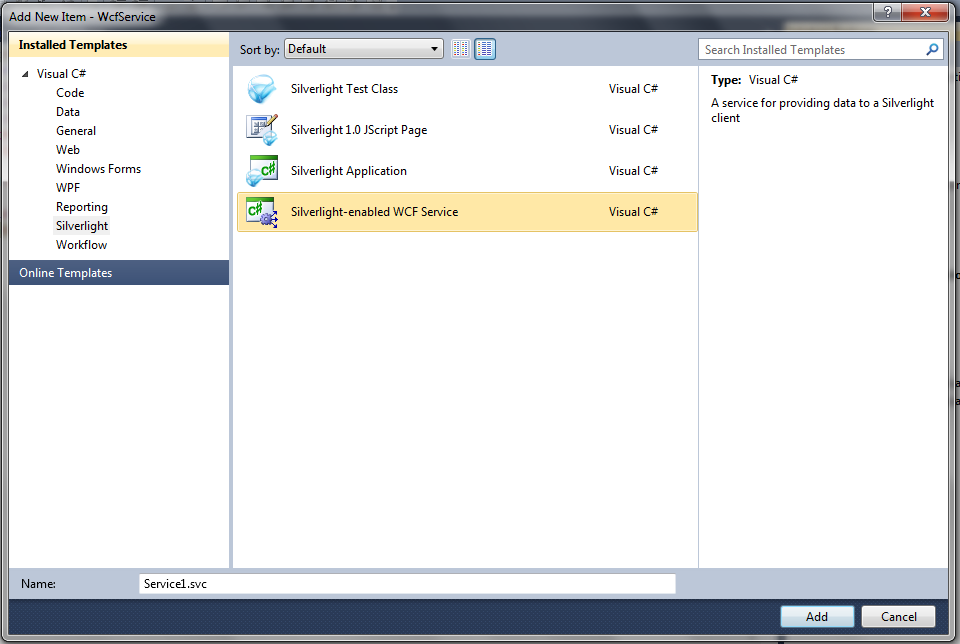
8. Select Silverlight from the left panel, and then select the Silverlight-enabled WCF Service from the list. Click the OK button to finish the wizard.
9. Double click the Web.config file in the WcfService project.
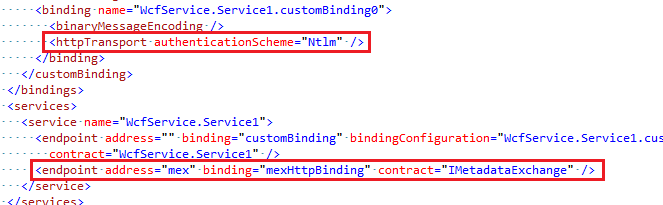
10. Add an authenticationSchema="Ntlm", remove metadata endpoint
11. Create a service method to read some data from DB
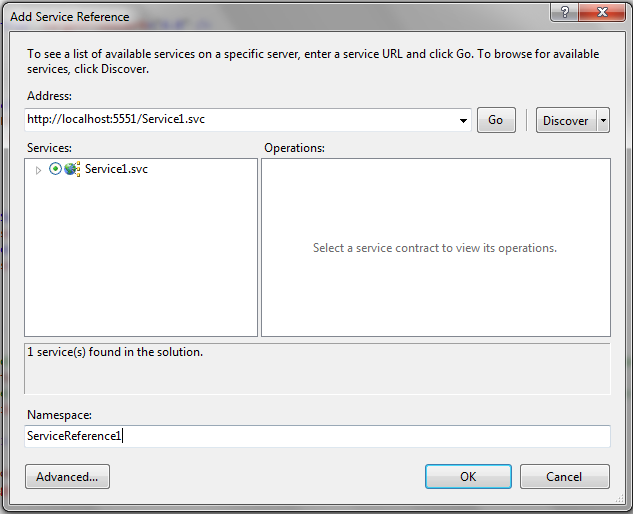
12. Add the WcfService reference to the Silverlight project
13. In silverlight project, add some controls to display the value which is got from that service method.
14. You can build and debug the project. (the value is got from DB.)

Deploy the project
When you debug the project, you can use the authenticationSchema="Ntlm", but when you try to deploy it, you need to change.
1. Double click the Web.config file in the WcfService project.
2. Change the authenticationSchema="Negotiate"
3. Deploy the service project to your server.
4. Edit you service reference address to the new web address.
5. Deploy the silverlight project to your server.
6. You have to set both the service web site and the silverlight web site as Windows Authentication.
7. Browse your asp.net page, you should be able to see the value read from DB.

Note: if you still can't see the value, please make sure if you did the following setting
* You have the cross domain file for your service web site
* You have turn the authentication schema to Negotiate
* You have set all sites as Windows Authentication and turned off the Anonymous Authentication